Free LUTs

Free Black and White LUT.

A black and white LUT converts footage to monochrome with intent — not a flat desaturation, but a proper tonal grade with deep blacks, clean whites, and controlled midtone contrast. VEL_Mono_Contrast is a rich, filmic conversion, and it downloads directly with no email.

Download VEL_Mono_Contrast.cube — Free, No Email

Want all 12 looks? Get the full free pack · Prefer a different look? Moody Dark · Moody Blue · Vintage Film

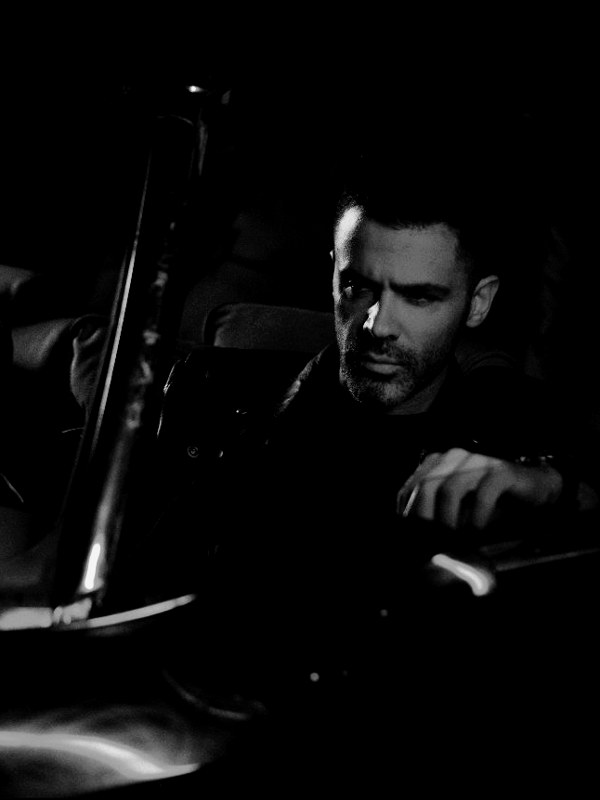
black and white LUT applied to travel footage — before and after color grade
Guide

How to get the black and white look.

  1. Download the .cube file
    VEL_Mono_Contrast.cube is a no-signup direct download above, and it comes inside the free 12-LUT pack too.
  2. Balance your footage first
    Even for black and white, expose correctly first — the LUT maps brightness to tone, so a clipped highlight or crushed shadow stays lost. A clean exposure gives the fullest tonal range.
  3. Apply in your editor
    Add it through Lumetri Creative in Premiere Pro, the Color page in DaVinci Resolve, a Custom LUT in Final Cut Pro, or Adjust → LUT in CapCut.
  4. Run it at full strength
    Unlike color LUTs, you usually keep this at 100%; if the contrast is too punchy for a soft scene, ease it to 80% or lift the shadows slightly.

How the look is built

A good black and white LUT is not simply saturation set to zero. It weights how each color maps to grey — reds and skin to bright mid-greys, blues and skies to deeper tones — then applies a contrast curve that gives rich blacks and clean whites. That tonal separation is what makes monochrome footage feel intentional instead of drained.

VEL_Mono_Contrast leans filmic: strong but not clipped contrast, with detail held in both the shadows and the highlights. The aim is the tonal depth of classic black and white cinematography, where a face still separates cleanly from a dark background without either turning to mud or paper.

It rewards footage with real texture and light direction — portraits, architecture, street, high-contrast scenes. Flat, evenly-lit footage turns grey and lifeless in mono, because there is no tonal contrast for the conversion to sculpt. Give it strong light and shadow and it sings.

Quick picks

Where this works best.

Where it shines

Portraits, street and documentary footage, architecture, dramatic high-contrast scenes — anywhere strong light and texture carry the frame.

Where to skip it

Flat, evenly-lit, low-contrast footage; without tonal contrast it turns grey and flat. Add contrast first or choose a color grade instead.

Pairs well with

Moody Dark when you want a desaturated look that still keeps a hint of color, rather than full monochrome.

FAQ

black and white LUT questions.

How do I get a cinematic black and white look?

Convert to monochrome, then add a strong contrast curve so blacks are deep and highlights are bright, and control the mid-grey tones so skin still has shape — a flat desaturation looks dull, real black and white has punch. A B&W LUT like VEL_Mono_Contrast does the conversion and contrast in one click, free and no email.

How do I get a black and white look in CapCut or on my phone?

Import the free .cube file in CapCut under Adjust → LUT, apply it, and set the strength to taste. The same file loads in Premiere Pro, DaVinci Resolve, and Final Cut Pro for the identical mono grade on desktop.

Where can I download a free black and white LUT?

Right here — VEL_Mono_Contrast.cube is a direct, no-email download in .cube format, ready for Premiere Pro, DaVinci Resolve, Final Cut Pro, CapCut, and any editor with LUT support.

How is a black and white LUT better than just removing saturation?

Pulling saturation to zero maps every color to a flat grey by brightness alone. A black and white LUT weights the colors — keeping skin, skies, and foliage as distinct tones — and adds a contrast curve, so the result has the tonal depth of real monochrome film rather than a washed-out grey.

Is this black and white LUT free for commercial use?

Yes — free for monetized videos, client work, films, and social content, with no attribution required.

Should I lower the intensity of a black and white LUT?

Usually no — mono conversions are meant to run at full strength. If a particular soft-lit clip looks too contrasty, reduce it to around 80 percent or raise the shadows a little, but most footage benefits from the full conversion.

Free Download

12 free LUTs.
Every look covered.

Professional .cube files. Free, no credit card. Browse every style:

Teal & Orange Vivid Teal Cinematic Golden Hour Sunset Warm Pastel Vintage Film Faded Film Moody Dark Moody Blue Black & White

Download the Free Pack