Free LUTs

Free Blue LUT.

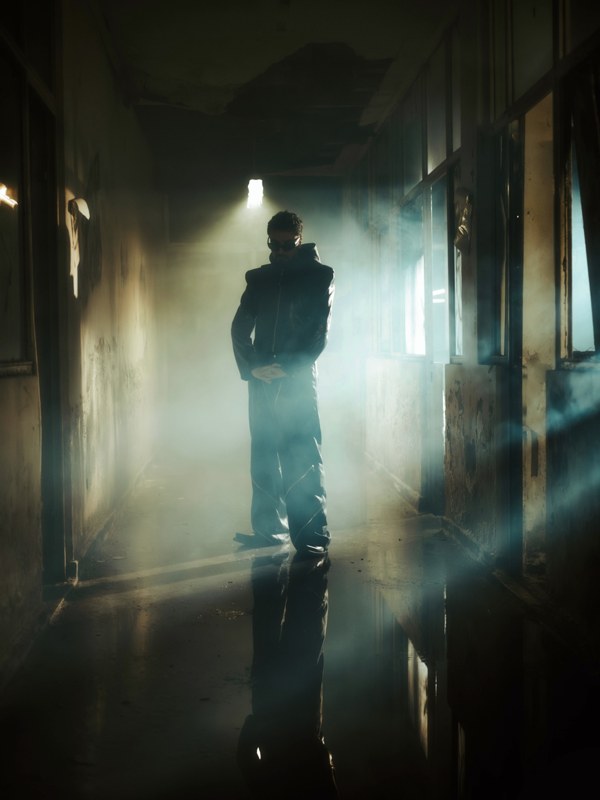
A blue grade cools the whole frame into deep, moody shadow — the cold, tense palette of thrillers, night scenes, and rainy-day drama. VEL_Moody_Blue pushes shadows toward navy while keeping just enough detail, and it downloads instantly with no email.

Download VEL_Moody_Blue.cube — Free, No Email

Want all 12 looks? Get the full free pack · Prefer a different look? Moody Dark · Black & White · Cinematic

moody blue LUT applied to travel footage — before and after color grade
Guide

How to get the moody blue look.

  1. Download the .cube file
    VEL_Moody_Blue.cube is a direct download here with no signup, and it is part of the free 12-LUT pack.
  2. Balance your footage first
    Set exposure first; this grade darkens and cools, so a clip that is already underexposed can lose shadow detail. Start from a clean, correctly-exposed image.
  3. Apply in your editor
    Bring it in through Lumetri Creative in Premiere Pro, the Color-page LUT menu in DaVinci Resolve, a Custom LUT in Final Cut Pro, or Adjust → LUT in CapCut.
  4. Dial it back to taste
    For a lighter mood rather than full noir, drop it to 60–80% and lift your shadows slightly afterward.

How the look is built

A moody blue grade drains warmth out of the image and pushes shadows and midtones toward deep blue and navy, while pulling overall brightness down so the frame feels heavy and cold. It is the visual language of tension: night, rain, isolation, unease.

The craft is in not going fully flat. A crude blue filter just tints everything the same cyan; VEL_Moody_Blue keeps a sliver of warmth in the brightest highlights and holds skin from turning fully blue, so faces stay readable and the cold reads as mood rather than a broken white balance.

It rewards low-key, shadowed footage — night exteriors, dim interiors, overcast and rain. Give it deep shadows and it deepens them beautifully. On bright, cheerful, sunlit footage it fights the light and simply looks wrong, so save it for scenes meant to feel cold.

Quick picks

Where this works best.

Where it shines

Night and low-light footage, thriller and horror scenes, rainy or overcast b-roll, music videos — anywhere cold tension is the goal.

Where to skip it

Bright, warm, happy footage like weddings and travel; the cold cast contradicts the mood. Use Golden Hour or Warm Film there instead.

Pairs well with

Moody Dark for a desaturated near-mono version, or Cinematic Teal when you want cool shadows without the full cold-blue drop.

FAQ

moody blue LUT questions.

How do I get a cold blue look in my video?

Shift the shadows and midtones toward deep blue, cool the highlights, and drop saturation a little so the frame feels cold and tense — the classic night and thriller look. A blue LUT like VEL_Moody_Blue applies it in one click, free and no email. Balance your footage first so skin doesn’t turn corpse-blue; pull to 60–80% if it’s too strong.

How do I get a blue look in CapCut or on my phone?

Download the free .cube file, open CapCut, tap Adjust → LUT, import it, and lower the intensity. The same file works in Premiere Pro, DaVinci Resolve, and Final Cut Pro for the same cold grade on desktop.

Where can I download a free blue LUT?

Right here — VEL_Moody_Blue.cube is a no-email, no-signup direct download, in .cube format for Premiere Pro, DaVinci Resolve, Final Cut Pro, CapCut, and any LUT-capable editor.

What is a moody blue LUT used for?

It creates a cold, tense atmosphere by cooling shadows to deep blue and lowering brightness — the palette of thrillers, night scenes, rain, and dramatic music videos. It turns ordinary footage moody and cinematic.

Is this blue LUT free for commercial use?

Yes — free for monetized videos, client work, films, and social content, no attribution required.

The blue LUT makes my footage too dark — what do I do?

It intentionally lowers brightness, so raise your exposure or lift the shadows a little before applying, and reduce the LUT strength to around 70 percent. Start from a correctly-exposed clip and the mood lands without losing detail.

Free Download

12 free LUTs.
Every look covered.

Professional .cube files. Free, no credit card. Browse every style:

Teal & Orange Vivid Teal Cinematic Golden Hour Sunset Warm Pastel Vintage Film Faded Film Moody Dark Moody Blue Black & White

Download the Free Pack