Vintage film brings the warmth and character of old celluloid — faded highlights, warm chrome tones, a nostalgic patina. VEL_Vintage_Chrome ages digital footage without ruining it. Free, no email.
Updated November 2026 · VEL_Vintage_Chrome.cube — a faded, warm vintage-film look with aged color.
Download VEL_Vintage_Chrome.cube — Free, No Email
Want all 12 looks? Get the full free pack · Related: Faded Film · Warm · Golden Hour
Old film reads as old for specific reasons: contrast is faded, highlights roll off softly instead of clipping, color drifts warm, and everything is a touch desaturated. Together they give that hazy, memory-like quality digital footage lacks by default.
VEL_Vintage_Chrome bakes those cues in — warm, characterful, and a little worn — so a clean modern clip picks up the feel of something shot decades ago.
Vintage Film is the warmer, more characterful one — chrome tones, amber cast, nostalgic patina. Faded Film is flatter and more neutral, a subtle matte look rather than a full period feel.
Pick Vintage when you want the footage to feel like an old memory or home movie; pick Faded Film when you just want to take the digital edge off.
A LUT gets you most of the way; a little added film grain and softer framing finish the illusion. Warm practical light in the scene — lamps, sun, neon — plays beautifully under it.
It is a natural fit for music videos, retro-styled projects, and travel films that want a timeless, shot-on-film feel.
Old film looks old because of the stocks, cameras and labs of its era. Knowing which era you are imitating makes it much easier to get a believable retro look from VEL_Vintage_Chrome.
For decades, family memories were recorded on Kodak stocks like Kodachrome and Ektachrome, often in Super 8 home movie cameras. Kodak discontinued Kodachrome in 2009, but its warm reds, golden yellows and slightly faded look still define what most people picture as a vintage film look.
Quentin Tarantino shot Once Upon a Time in Hollywood on 35mm film with cinematographer Robert Richardson to recreate Los Angeles in 1969. If you're going for a late-60s or 70s film look, pull up a few frames from it while you grade. The sun-faded warmth and soft contrast are hard to beat.
Paul Thomas Anderson's Licorice Pizza, set in 1973, was also shot on film and leans into grain, warm skin and slightly muted color. Films like this are why editors search for a 70s film look or a retro film LUT for music videos and fashion pieces.
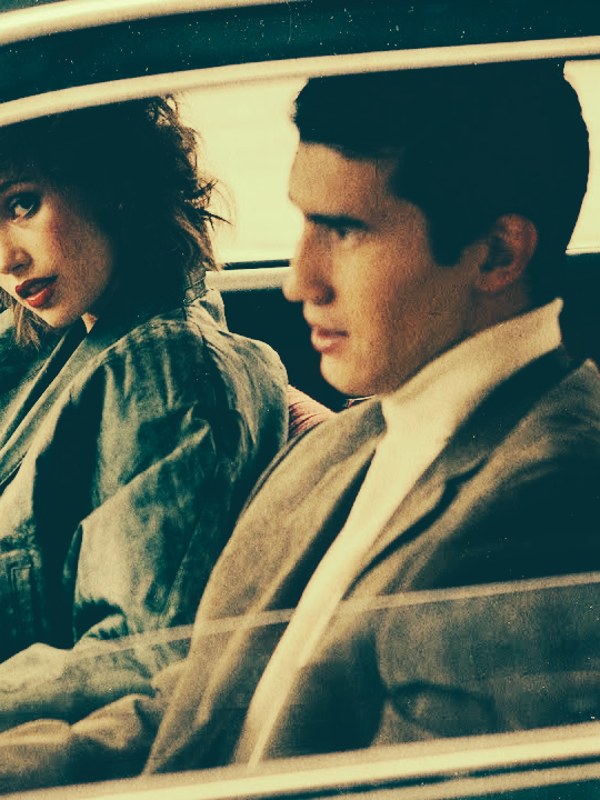
Nothing breaks a vintage grade faster than a smartphone, a modern car or an LED sign in the background. Walk the frame before you roll and take out anything that could not have existed in the era you are imitating.
Browns, mustard, burnt orange, olive and cream were everywhere in 70s clothing and interiors. Wardrobe and props in that palette give the LUT's warm cast something to agree with.
Handheld, slightly imperfect movement feels like a home movie, and a slow zoom feels like 70s cinema. A smooth drone or gimbal shot gives the game away right away.
Home movies and older TV were nearly square. If you want that feel, frame a little wider than usual so you can crop to 4:3 in the edit without cutting off heads.
Vintage reads as film, so a light grain layer over the LUT makes it convincing.
The look lifts blacks and warms color; keep both subtle so it's nostalgic, not broken.
A touch of diffusion or reduced sharpening suits the aged feel.
Crisp modern subjects can clash with a vintage grade — it suits timeless or retro content best.
Use 24 fps for a 70s cinema look. For a Super 8 home movie feel, many editors conform footage toward 18 fps, which was a common Super 8 speed and gives slightly stuttery motion.
Very sharp modern phone footage needs 70 to 90% to lose its digital edge. Softer footage, or clips shot on vintage lenses, often looks right around 50 to 70%.
Pure digital white is a modern giveaway. Lower the very top of the highlights slightly so whites sit at a creamy off-white, the way they do on old prints.
Real film wobbles slightly in the camera gate and sometimes catches light leaks at the end of a roll. A gentle gate weave and the occasional warm leak at low opacity are more convincing than heavy dust and scratch overlays.
Vintage Film covers one era. The Master Grade Collection has full Vintage and Film categories to pick from, and Black & White for the moments when even faded color feels too modern.
Fade the contrast, warm the color, soften the highlights, and desaturate slightly — VEL_Vintage_Chrome does it in one click, free and no email. Add a touch of film grain to complete the look.
Vintage Film is warmer and more characterful, with chrome tones and a nostalgic patina. Faded Film is a flatter, more neutral matte look. Vintage feels like an old memory; faded just takes the digital edge off.
Yes — a subtle grain overlay on top of the LUT sells the celluloid feel far better than color alone. Keep it light so it reads as texture, not noise.
Very — the warm, worn, shot-on-film character suits music videos, retro-styled projects, and nostalgic travel films especially well.
Yes — free for monetized YouTube, client work, and social, no attribution required.
60–85%. Too strong and the faded, warm cast looks damaged rather than nostalgic.
Yes — paired with grain and a soft or 4:3 frame, it reads convincingly retro.
Yes — it's a quick way to age crisp phone footage; add grain and slight softening to complete the look.
Nudge the overall temperature up a touch above the LUT, but keep highlights from going fully orange.
It suits nostalgic, timeless wedding edits — keep it gentle so skin stays flattering.
Professional .cube files. Free, no credit card. Browse every style: